Product Cutouts

Product Photography AIBy Indian UGC Team10 min read

AI Background Remover for Product Photos in India

An AI background remover is useful when a product photo already shows the right SKU but the background is messy, inconsistent, or unusable for ecommerce. Indian brands should create one clean transparent cutout first, check product edges and shadows, then reuse that approved asset for marketplace support images, PDP lifestyle scenes, static ads, or AI UGC video prompts.

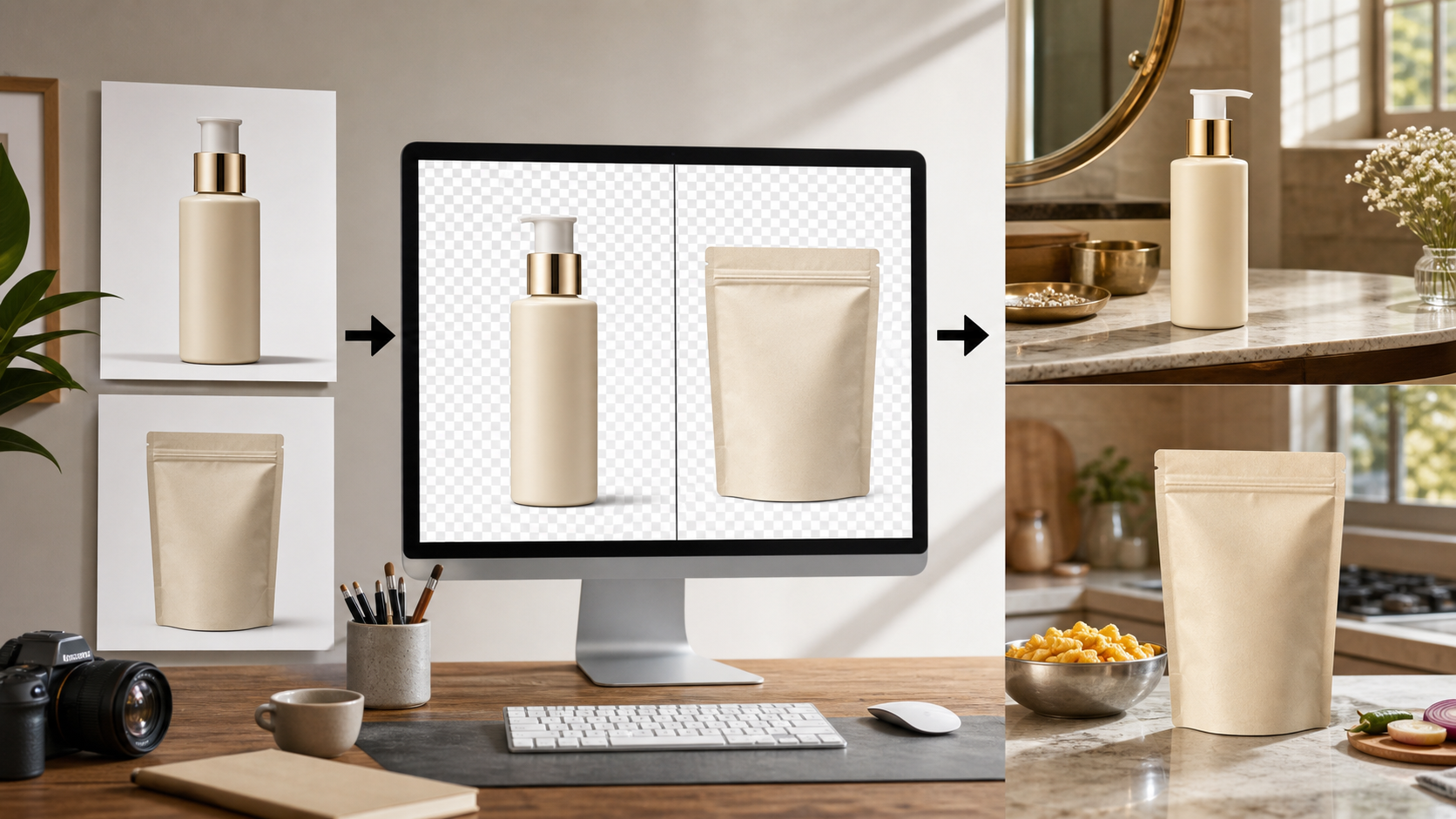
Indian ecommerce product photo workflow showing source images, transparent cutouts, and final lifestyle product photos

What is an AI background remover for product photos?

An AI background remover is an image-editing tool that separates the product from its original background so the product can be placed on a clean, transparent, white, studio, lifestyle, or ad-ready scene. For ecommerce teams, the cutout is the reusable asset. Once the product edge is clean and accurate, the same visual can support PDP images, marketplace listings, static ads, and short video concepts.

AI background remover is the fastest way to turn a usable product photo into a reusable product cutout for ecommerce creative.

Use /blog/ai-product-photography-for-ecommerce-india when the team is still deciding where AI product photography belongs.

Use /blog/ai-product-photography-backgrounds-india after the cutout is ready and the next question is scene choice.

Use /blog/ai-product-photography-marketplace-images-india before uploading generated product images to marketplace or shopping-feed pages.

Use /dashboard/static-ads when the approved product cutout needs hook, offer, or retargeting layouts.

When should Indian brands remove the background first?

Remove the background first when the product is correct but the photo is not campaign-ready. This is common when catalog teams have WhatsApp vendor photos, shoot leftovers, phone camera images, old listing photos, or packshots with uneven lighting. A clean cutout gives the team a controlled starting point before changing scenes or creating ads.

Good fit: product is sharp, packaging is correct, label direction is acceptable, and the problem is clutter or inconsistency behind it.

Bad fit: product is blurry, cropped, distorted, poorly lit, or shows the wrong variant.

Beauty: isolate the bottle, tube, jar, or texture swatch before creating vanity or routine scenes.

Food and beverage: isolate the pouch, jar, tin, box, or bottle before adding kitchen, breakfast, or office-snack context.

Fashion accessories: isolate bags, jewelry, sunglasses, footwear, or watches before building styling scenes.

Home and utility products: isolate the SKU before showing scale, before-after use, or storage context.

How do you remove a product-photo background without making it look fake?

Start with the highest-resolution source photo, remove the background, then inspect the product edge before changing anything else. The image starts looking fake when the cutout has missing corners, halo edges, mismatched shadows, wrong scale, or generated packaging details. Fix the physical cues before adding a new scene.

Fast rule: approve the cutout before approving the new background.

Zoom into edges around caps, handles, transparent plastic, fabric texture, hairline jewelry, and shadows.

Keep one product, one camera angle, one surface, and one light direction for the first output.

Avoid generated readable label text, fake badges, extra accessories, exaggerated reflections, or props that imply an included item.

Source note: Google Merchant Center image guidance asks merchants to show the full product clearly, avoid placeholders, promotional overlays, borders, and preserve AI-generated image metadata where applicable: https://support.google.com/merchants/answer/6324350

Source note: Amazon Seller Central image guidance keeps the main image product-focused while allowing supporting media for additional product context: https://sellercentral.amazon.com/help/hub/reference/external/G1881

What is the easiest ecommerce workflow after background removal?

The easiest workflow is cutout, clean catalog image, one lifestyle scene, then one static ad. Do not jump from a messy product photo straight into ten creative variants. A small sequence lets the team catch product errors early and reuse the same approved visual across PDP, marketplace support images, and paid social.

Step 1: choose the cleanest real product photo and remove the background.

Step 2: create a white or simple studio version for catalog and internal review.

Step 3: create one lifestyle background that answers a buyer hesitation.

Step 4: turn the approved product visual into static ads in /dashboard/static-ads.

Step 5: use the same product image as the anchor for /dashboard/ugc-video when the team needs motion.

For prompt structure, use /blog/ai-product-photography-prompts-india before scaling a whole product line.

When should a cutout become a marketplace image, PDP image, or ad?

Choose the final use by the job of the image. A marketplace image should make the product easy to verify. A PDP image should answer a shopping question. A static ad should make one hook or offer obvious on mobile. The same cutout can feed all three, but each output needs a different review standard.

Marketplace main image: use a strict product-led image, often studio or white background, after checking platform rules.

Marketplace support image: use a simple context scene only if the product remains easy to verify.

PDP lifestyle image: show size, texture, routine, use case, or storage context.

Static ad: add benefit hierarchy, offer, hook, or comparison outside the product cutout workflow.

AI UGC video: use the cutout as the product reference, then define creator persona, scene, and one product action.

Why do AI background remover outputs fail?

AI background remover outputs fail when teams treat a clean-looking cutout as a finished product image. The product may lose fine edges, shadows may disappear, transparent materials may look wrong, or the new scene may change scale. The fix is boring but reliable: inspect the cutout, simplify the scene, and publish only images that keep the SKU recognizable.

Edge halo: visible old background around the product edge.

Missing product detail: cap, handle, chain, strap, zipper, nozzle, or label edge disappears.

Wrong shadow: product floats because contact shadow was removed.

Wrong scale: product becomes too large, too small, or physically impossible in the scene.

Wrong promise: generated scene implies results, certification, quantity, or accessories the product does not include.

Wrong format: the image should have become a static ad or UGC video instead of a product photo.

Product background removal decision table

Image job
Best next step
Reject if
Messy vendor photo
Remove background and create one clean cutout
Product is blurry, cropped, or the wrong variant
Marketplace main image
Use a strict product-led background
Props, overlays, or scene details distract from the SKU
PDP lifestyle image
Place cutout in one buyer-relevant Indian setting
Scale, light, or product contact looks fake
Static paid-social ad
Use the cutout inside /dashboard/static-ads
The visual lacks one clear hook, offer, or benefit
AI UGC video
Use the cutout as a product reference in /dashboard/ugc-video
The video prompt asks AI to invent packaging details

Best For

Indian D2C teams cleaning vendor, catalog, or shoot-leftover product photos

Marketplace sellers who need product-led support images before creating ads

Performance marketers turning one approved product image into static ad variants

Agencies building repeatable product-photo systems for multiple SKUs

Not Ideal For

Fixing blurry, low-resolution, or incorrect product photos

Replacing platform, legal, or claims review for regulated categories

Changing packaging, label, variant, quantity, ingredient panel, or safety information

Luxury campaign hero images where exact lighting, material, and art direction are the value

Examples

Skincare bottle: remove bathroom clutter, approve the bottle edge, create one vanity scene, then build a retargeting static ad around routine fit.
Snack pouch: isolate the pack from a vendor photo, create a clean catalog image, then test kitchen-counter and office-snack backgrounds.
Copper bottle: preserve the exact bottle shape, add a simple breakfast-table scene, and reject outputs with distorted cap or reflection.
Jewelry: remove the background only if fine edges stay intact; use a real close-up if the chain or stones become soft.
Home organizer: create a cutout first, then use separate before and after scenes instead of one crowded background.
Fashion accessory: isolate the bag or sunglasses, then create one mirror or wardrobe scene for PDP context.
Regional creative: keep the product cutout fixed, then adapt the final static ad in Hindi, Tamil, Marathi, or Bengali after product QA.
Video follow-up: use the approved cutout as the source image when generating a product-in-hand AI UGC video.

FAQs

What is an AI background remover?

An AI background remover is an image-editing tool that separates the subject from the original image background. For ecommerce product photos, it creates a clean product cutout that can be reused on white backgrounds, lifestyle scenes, PDP images, static ads, and video prompts.

What is the best way to remove background from product photos?

Use the sharpest real product image, remove the background, inspect edges and shadows, create one clean catalog version, then create one buyer-relevant lifestyle version. Reject outputs that change product shape, label, color, scale, or included accessories.

Can I use AI background remover outputs for Amazon or Flipkart?

Use them carefully. AI background removal can help create clean product-led images, but marketplace images still need platform review. Keep main images conservative, avoid promotional overlays, and use lifestyle or generated scenes mainly for support images when allowed.

How do I make product cutouts look less fake?

Match the cutout with the new background's camera angle, scale, light direction, contact shadow, and surface. Most fake-looking outputs happen because a sharp product is pasted into a soft scene with no realistic shadow or size reference.

When should I use a product background generator after removing the background?

Use a product background generator after the cutout is approved and the team knows the image job. Choose a clean marketplace support scene, a PDP lifestyle scene, or a static ad layout based on the buyer question the image must answer.

Should I remove white background from image files before making ads?

Yes, if the white background limits layout flexibility or creates awkward crops. Remove it once, approve the transparent product cutout, then reuse that asset across paid-social layouts, offer cards, comparison ads, and AI UGC prompts.

Can AI product photography replace a studio shoot?

For ecommerce testing, PDP refreshes, lifestyle scenes, and paid social variants, AI product photography can reduce dependence on studio shoots. High-stakes hero campaigns may still need a real shoot.

Is AI product photography useful for Indian marketplaces?

Yes, especially for lifestyle scenes, social ads, secondary PDP images, and category-specific visuals. Marketplace main images may still need strict compliance checks.

Can I generate product videos from one image?

Yes. A product image can guide the product appearance while the prompt defines the scene, creator, camera movement, and action.