Reels Production Guide

UGC Video AdsBy Indian UGC Team9 min read

Instagram Reels Size for UGC Ads: India Guide

Use a 9:16 vertical canvas at 1080 × 1920 pixels for Instagram Reels and Reel-style UGC ads. Keep faces, products, subtitles, prices, and calls to action away from the extreme top and bottom because Instagram interface controls and placement crops can cover them. Export a clean master, preview it in the actual placement, and check every important frame on a phone before publishing.

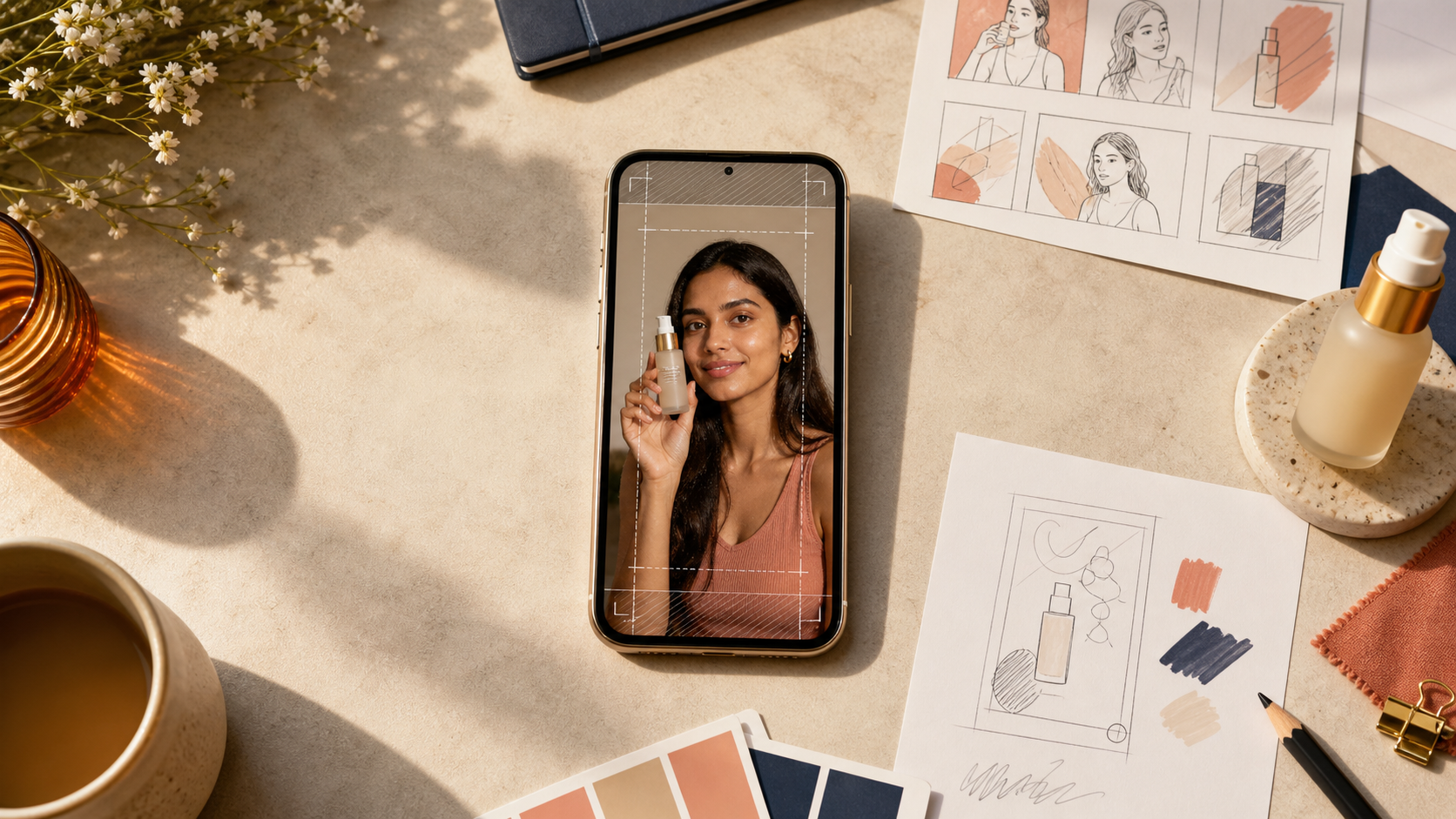
Indian creator-style product video framed with Instagram Reels safe-zone guides on a smartphone

What size should an Instagram Reel be?

Instagram Reels size is the pixel canvas and aspect ratio used for a vertical Reel. The safest production master is 1080 × 1920 pixels at 9:16. That fills a modern phone screen and gives Meta room to deliver the asset in full-screen vertical placements without adding borders or forcing a landscape video into a narrow frame.

Canvas: 1080 pixels wide by 1920 pixels high

Aspect ratio: 9:16 vertical

Orientation: portrait, with the phone held upright

Create one clean master without platform buttons burned into the video

Source note: Meta's Ads Guide lists placement-specific video specifications and recommendations, facebook.com/business/ads-guide/update.

What is the fastest safe-zone rule for UGC ads?

Put the creator's face, product action, main subtitle, offer, and CTA inside the central area of the 9:16 frame. Treat the top and bottom edges as interface space, not message space. A practical first review is simple: if the ad still makes sense after loosely covering the top and bottom of the phone, the composition is resilient.

Keep the spoken hook visible in the middle third rather than tight against the top

Move subtitles above the lower caption and button area

Do not place a price, coupon code, or disclaimer on the final few rows of pixels

Leave breathing room beside the product so placement crops do not cut off packaging

Preview in Instagram because interface layouts can vary by placement, device, and account

How should you frame a creator and product in 9:16?

Frame the creator close enough to read emotion on a phone, but reserve room for the product action. For a talking-head UGC ad, eye level belongs above the centre and the product should enter near the middle. For a demo, the hands and product matter more than a perfect portrait; compose around the action the buyer must understand.

Review ad: creator at medium close-up, product visible by the first useful beat

Demo ad: hands and SKU centred, with labels facing the camera when accuracy matters

Before-and-after ad: split the frame deliberately instead of squeezing two landscape clips side by side

App or website demo: enlarge the critical interaction and keep supporting creator footage secondary

Build the creative idea first with /blog/ugc-video-script-examples-india

What Instagram Reel cover size should you use?

Design the Reel cover from the same 1080 × 1920 vertical canvas, but keep the title and product inside the centre because profile grids and other surfaces may show a tighter crop. The cover should identify the product or buyer problem at thumbnail size; it does not need to repeat every claim from the video.

Use one short title, one clear product image, and strong foreground-background contrast

Keep essential words and faces near the centre of the cover

Preview both the full-screen cover and the profile-grid crop before posting

Avoid tiny disclaimers or multi-line feature lists that disappear at thumbnail size

How do you export a UGC video without losing quality?

Export from the original vertical timeline rather than repeatedly downloading and re-uploading compressed copies. Use a widely supported MP4 workflow, keep the source frame rate consistent, and watch the final file on a phone. Product labels, skin texture, fast hand movement, subtitles, and gradients reveal compression problems quickly.

Edit and export at 1080 × 1920 instead of enlarging a small finished clip

Keep one high-quality clean master for future edits and platform variants

Avoid sending the only master through messaging apps that may compress video

Check subtitle sharpness, audio sync, product colour, and motion after export

Generate a vertical first draft through /dashboard/ugc-video before commissioning multiple variants

How do Instagram Reel dimensions change the UGC script?

Dimensions are not just an export setting; they shape the script. A mobile 9:16 ad has limited room for a face, product, subtitle, and UI at once. Write one visible action per beat, shorten on-screen lines, and show the product while the spoken claim is being made instead of stacking every idea into the opening frame.

Hook: one buyer problem or discovery that fits in a short subtitle

Proof: one visible product action rather than a list of benefits

Objection: one clear answer supported by what appears on screen

CTA: one next step positioned above the lower interface area

Use /blog/ugc-hooks-examples-india when the opening line is the weak point

Why does a correctly sized Reel still look wrong?

A Reel can be exactly 1080 × 1920 and still fail because sizing does not fix composition. Common problems are subtitles hidden by controls, a landscape clip enlarged until the product is cut off, a creator framed too far away, an inaccurate AI-generated packshot, or a cover whose title disappears in the profile crop.

Hidden subtitles: raise them and test the live placement preview

Cropped product: return to the source and reframe instead of scaling the finished export

Tiny creator: use a closer crop or separate the talking head from the product demo

Wrong product details: compare every AI frame with the approved SKU image

Weak first frame: review /blog/ad-creative-testing-india and isolate the hook before changing the whole ad

Instagram Reels production decision table

Production choice
Use this
Check before publishing
Reel canvas
1080 × 1920, 9:16 vertical
No borders or accidental landscape crop
Creator framing
Phone-readable medium close-up
Face and product remain clear under interface controls
Subtitles
Short lines in the central safe area
No overlap with captions, buttons, or CTA
Cover
Vertical cover with centred essentials
Title survives the profile-grid crop
Master export
Clean high-quality MP4
Audio sync, colour, labels, and motion survive compression
Ad variants
Change one hook or scene at a time
Core product action and offer stay controlled

Best For

Indian D2C teams producing Reels and paid-social UGC

Creators who need a repeatable vertical-video handoff

Editors adapting one approved concept into multiple 9:16 variants

Performance marketers checking mobile readability before launch

Not Ideal For

Assuming one crop will look identical in every Meta placement

Using dimensions as a substitute for product accuracy or claim review

Placing essential text against the top or bottom interface areas

Publishing without checking the rendered video on a real phone

Examples

Skincare demo: face in the upper-middle area, bottle and texture action centred, subtitles above the lower controls.
Snack reaction ad: pack visible before the reaction, one flavour line on screen, close-up cutaway for texture.
Fashion try-on: full garment shown in a dedicated beat, then a closer creator reaction instead of one distant shot.
App demo: screen interaction enlarged in the centre with the creator used for the hook and CTA.

FAQs

What is the best Instagram Reels size?

Use 1080 × 1920 pixels with a 9:16 vertical aspect ratio. Keep essential faces, products, subtitles, offers, and calls to action away from the extreme top and bottom, then preview the Reel in Instagram before publishing.

What is the Instagram Reels size ratio?

The standard full-screen Instagram Reels aspect ratio is 9:16. A 1080 × 1920 pixel canvas uses that ratio and is the practical production master for vertical creator-style videos and Reel ads.

Should UGC videos be vertical or horizontal?

Create UGC intended for Reels as vertical 9:16 video. If the campaign also needs landscape or square placements, plan separate compositions or capture wider source footage; simply cropping a finished vertical ad can cut off the product, hands, or subtitles.

Why are my subtitles cut off on Instagram Reels?

Subtitles are usually cut off because they sit under Instagram's captions, buttons, or placement crop. Move them into the central safe area, shorten each line, and preview the final upload on a phone rather than relying only on the editing timeline.

Can I use the same 9:16 UGC video as an Instagram ad?

Usually, yes: a clean 9:16 master is a strong starting point for Reel-style paid placements. Check the exact placement preview, ad text, CTA, subtitles, claims, music rights, and product accuracy in Ads Manager before launch.

Can AI UGC replace real creators?

AI UGC is best for fast creative testing, early campaign drafts, hook exploration, and low-cost content volume. Real creators still matter for influencer distribution, creator trust, and testimonial rights.

Does AI UGC work for Indian audiences?

It can work well when the prompt includes Indian personas, local language, realistic home settings, product-in-hand moments, and duration-safe dialogue instead of generic global stock-style scenes.

What assets do I need to start?

A product name, a short product brief, and ideally one clean product image are enough to generate the first AI UGC video or product visual.