Footwear Ecommerce

AI Product PhotographyBy Indian UGC Team11 min read

AI Footwear Product Photography for Indian Ecommerce

AI footwear product photography works when the real shoe remains the source of truth. Capture clean side, top, rear, sole, and material-detail references; lock the silhouette, panel count, stitching, colour, sole geometry, and logo placement; then generate one scene at a time and reject every output that changes the SKU.

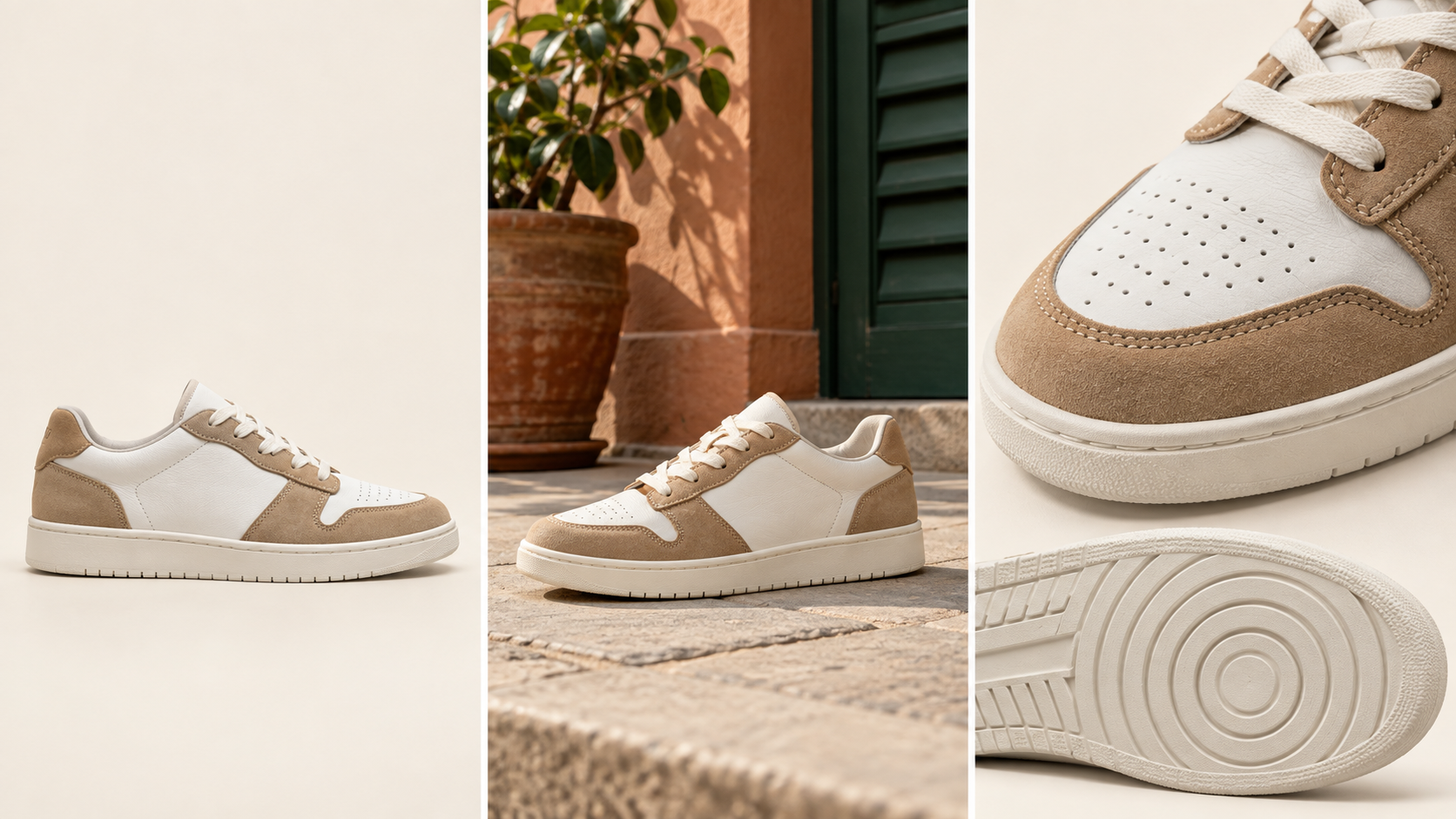
Consistent sneaker shown in studio, lifestyle, and detail frames for AI footwear product photography

What is AI footwear product photography?

AI footwear product photography is a controlled image workflow that uses accurate shoe references to create new backgrounds, lifestyle scenes, crops, or campaign variations. AI may change the setting and lighting, but it should not redesign the upper, sole, laces, stitching, colourway, branding, or construction that a customer expects to receive.

Start with the broader product workflow: /blog/ai-product-photography-for-ecommerce-india

Use /blog/ai-product-photography-marketplace-images-india for channel-specific catalog checks

Use /blog/ai-product-photography-backgrounds-india when the main decision is studio versus lifestyle context

Turn an approved footwear image into a paid-social layout in /dashboard/static-ads

What is the fastest safe workflow for AI shoe photos?

Use a six-step workflow: approve a multi-angle source set, write a product lock, choose one buyer question, generate three to five controlled frames, compare every frame with the real SKU, and export only the asset that passes. This is faster than generating a full campaign before discovering that the sole or colourway changed.

1. Capture side, three-quarter, top, rear, sole, and close material views under neutral light

2. Lock silhouette, toe shape, panel count, eyelets, laces, stitching, logo, outsole pattern, and colour

3. Choose one job: clean PDP support, material detail, on-foot context, scale, or paid-social hook

4. Specify one believable surface or Indian use setting and one camera angle

5. Generate a small batch without changing the product description

6. Review at full size and mobile thumbnail size before adding copy or an offer

How do you photograph the source footwear?

Photograph both shoes cleanly and consistently before using AI. Keep the camera height, focal length, white balance, and product orientation stable. Include views that reveal construction—not only the flattering hero angle—because the model cannot preserve a tread, heel counter, buckle, or material transition it cannot see.

Remove dust, loose threads, creases, and temporary packing material before capture

Shoot the outer and inner side when their panels or branding differ

Add sole and heel views for tread, cushioning, and construction accuracy

Capture leather grain, mesh, knit, suede, hardware, embroidery, and reflective details close-up

Record the approved colour name and compare it on a colour-managed screen

How do you prompt AI footwear photography without changing the shoe?

Write the prompt in two layers: locked product facts first, editable scene second. Name the exact shoe type, materials, colourway, panels, lace system, sole shape, tread, and visible branding; then describe surface, setting, light, camera, crop, and image job. Vague prompts invite a plausible but different shoe.

Product lock: preserve exact silhouette, toe box, upper panels, stitching, eyelets, laces, heel, midsole, outsole, colour, and logo placement

Scene: neutral studio, wardrobe floor, running route, office commute, festive styling, or another buyer-relevant context

Camera: side profile or three-quarter product view with natural perspective and believable floor contact

Light: one soft directional source with shadows that match the surface

Exclusions: no extra logos, invented text, changed tread, duplicated lace holes, warped pairs, or accessories not included

Use /blog/ai-product-photography-prompts-india for the reusable prompt structure

Which footwear details must pass the fidelity check?

Check the parts that identify the SKU and affect trust: shape, material, construction, colour, branding, and pair consistency. A polished image still fails if the left and right shoes differ, the outsole gains a new pattern, leather becomes plastic, or a sandal strap attaches in an impossible place.

Shape: toe profile, opening, heel height, arch, proportions, and left-right symmetry

Construction: panel count, seam paths, eyelets, straps, buckles, pull tabs, and sole layers

Material: leather grain, knit density, mesh, suede nap, rubber finish, and reflectivity

Colour: upper, trim, lining, laces, midsole, and outsole match the approved colourway

Branding: real placement and scale only; never publish invented logos or unreadable generated labels

Contact: both shoes sit on the surface with consistent perspective, shadows, and no floating edges

Which footwear images should be real, AI-assisted, or generated?

Keep purchase evidence closest to reality and use AI where context adds value. The main PDP packshot, sole, size cues, and construction details should remain real or tightly retouched. AI-assisted scenes can support styling and use cases. Expressive generated compositions belong in ads only after the shoe passes SKU review.

Main PDP and marketplace image: real studio image or precise background cleanup

Sole, material, hardware, and size evidence: real close-ups and diagrams

PDP lifestyle support: controlled AI scene after side-by-side product review

Seasonal or regional campaign: AI-assisted setting with the approved shoe unchanged

Paid-social static: approved product visual plus editable hook, offer, and CTA

On-foot fit or gait proof: real shoot when exact fit, comfort, or movement is the claim

Why do AI footwear photos look fake?

AI shoe photos look fake when the scene is detailed but the product specification is weak. Typical failures include mismatched pairs, impossible laces, changing sole thickness, melted tread, plastic materials, floating contact shadows, and feet that do not fit the shoe. Simplify the scene and strengthen the product lock before adding styling.

Different left and right shoes: generate one approved shoe view first, then build the pair

Wrong sole or tread: supply dedicated side and outsole references and reject invented geometry

Synthetic-looking material: use close material references and softer, less glossy light

Warped on-foot image: use a real shoot when foot interaction and fit are central

Tiny product in a busy scene: reduce props and crop for mobile recognition

Unreadable label or offer: add typography after generation in a controlled ad layout

Footwear product photography decision table

Image job
Best production method
Must-pass check
Main PDP packshot
Real studio photo or precise retouch
Exact silhouette, colourway, pair, and sole
Material or tread detail
Real macro close-up
Texture, seam, hardware, logo, and outsole accuracy
PDP lifestyle image
Controlled AI-assisted scene
SKU unchanged and context answers one buyer question
Marketplace support image
Compliant real or reviewed composite
Current platform rules, accurate product, no invented claims
Seasonal campaign
AI-assisted scene from approved source
Product remains prominent and locally believable
Paid-social static
Approved shoe visual plus designed layout
Mobile clarity, verified offer, editable text, and CTA

Best For

Indian footwear brands expanding PDP and campaign imagery from approved source photos

Ecommerce catalog teams producing lifestyle variations across many colourways

Performance marketers turning accurate shoe images into static ad tests

Founders testing scene directions before commissioning a full shoot

Not Ideal For

Replacing real fit, comfort, gait, size, or performance evidence

Inventing materials, cushioning technology, waterproofing, or durability claims

Publishing marketplace main images without checking current platform rules

Using generated on-foot images when the shoe-foot interaction is visibly wrong

Examples

Running shoe: preserve the midsole stack, mesh panels, heel counter, lace path, and outsole while testing an early-morning urban route.
Leather loafer: keep toe shape, welt, grain, stitching, and hardware exact while creating office and occasion settings.
Sandal: verify every strap, buckle, attachment point, footbed, and sole edge before using a summer lifestyle scene.
Sneaker drop: keep the approved colourway identical across studio, street-style, detail, and static-ad variants.

FAQs

Can AI create footwear product photos?

Yes. AI can create backgrounds, lifestyle scenes, crops, and campaign variants from accurate footwear references. Keep real packshots and detail photos as the source of truth, and reject outputs that change shape, panels, stitching, material, colour, branding, sole, tread, or pair consistency.

What shoe photos do I need before using AI?

Capture side, three-quarter, top, rear, sole, and close material views under neutral light. Include the inner side when it differs, record the approved colourway, and photograph any logo, buckle, tread, seam, or construction detail that must remain exact.

How do I make AI shoe photos look realistic?

Lock the product specification, use a simple believable scene, keep the camera perspective natural, match floor contact and shadows, and compare every output with the real pair. Review both shoes independently because AI often introduces small left-right differences.

Can AI footwear photography replace a studio shoot?

It can reduce background, lifestyle, seasonal, and ad-variation shoots, but it should not replace accurate packshots, sole and material details, fit evidence, or strict marketplace imagery. A hybrid workflow protects product trust while reducing production effort.

What is the best AI footwear image to create first?

Create one lifestyle support image that answers the biggest buyer hesitation, such as styling, occasion, scale, or everyday use. Approve the shoe against the real SKU first, then reuse the verified visual for a PDP module or static ad.

Can AI product photography replace a studio shoot?

For ecommerce testing, PDP refreshes, lifestyle scenes, and paid social variants, AI product photography can reduce dependence on studio shoots. High-stakes hero campaigns may still need a real shoot.

Is AI product photography useful for Indian marketplaces?

Yes, especially for lifestyle scenes, social ads, secondary PDP images, and category-specific visuals. Marketplace main images may still need strict compliance checks.

Can I generate product videos from one image?

Yes. A product image can guide the product appearance while the prompt defines the scene, creator, camera movement, and action.